News · News · Console Gaming · Handheld Gaming
Switch 2 Files Show Every PC DLSS Model, Plus Two Lite Presets PCs Don’t Have
A developer pulled the DLSS models off the Switch 2: the same files as PC up to DLSS 4, no 4.5, and two faster presets PCs don’t have. Unconfirmed by Nintendo or NVIDIA.
https://averagetechnerds.com/switch-2-dlss-files-dlss-4-lite-presets/
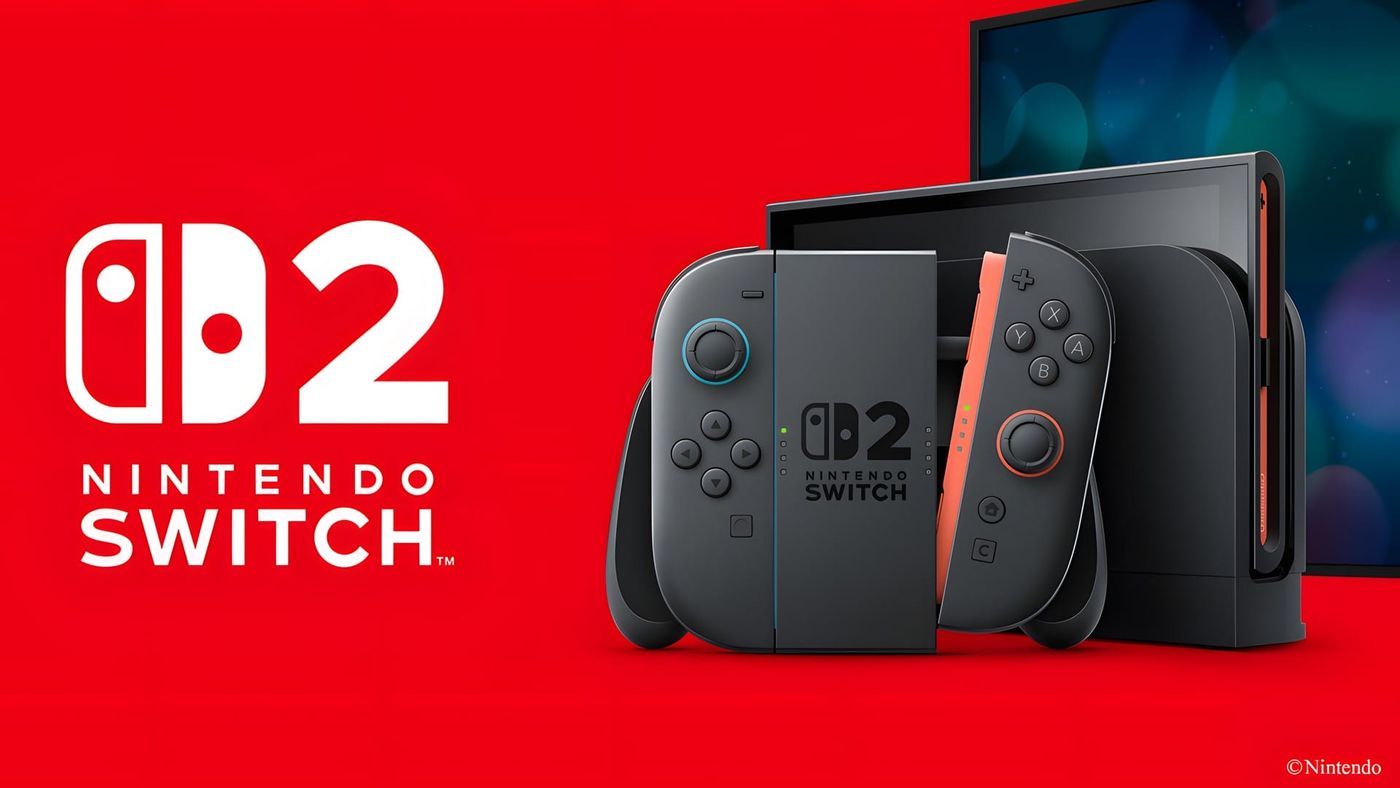
Nintendo has never told you which version of NVIDIA’s DLSS your Switch 2 uses. Now a developer has pulled the DLSS files off the console and posted what’s inside. Nearly every model a PC gets is on there, including DLSS 4. And two presets aren’t on PC at all. They look like the lighter DLSS your Switch 2 games already use.
What did the developer find?
Every DLSS model a PC game can use, up to DLSS 4. In his post on X, the Switch 2 ships “all desktop models/presets including DLSS 4, however no 4.5,” the exact same files as on PC. He doesn’t say how he got them out. The console’s October jailbreak, covered in our Switch 2 jailbreak article, is one possible way in.
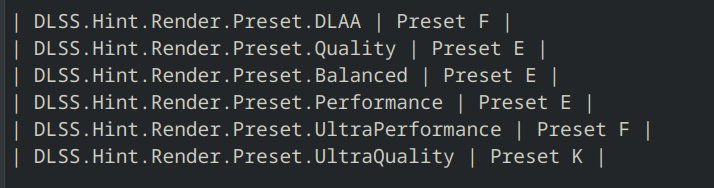
He also posted the console’s default preset for each DLSS mode. A preset is one version of the DLSS model, named with a letter.
Who is Eren Doğan?
Someone who works with AI models for a living. He’s the CEO of Anlatan, the company behind NovelAI, an AI writing and image service that trains its own models. A folder of neural network weights is familiar ground for him. You shouldn’t take his read as official, but you can trust that he knows what a model looks like.
What is DLSS, and what’s a preset?
DLSS is NVIDIA’s AI upscaling. Your game draws each frame at a lower resolution, and an AI model fills in the detail to make it look sharper. That’s how a Switch 2 game can look close to 4K on your TV without the console drawing 4K. NVIDIA confirms the Switch 2’s chip has Tensor Cores, the parts that run DLSS.
There are two kinds of DLSS model, and you see the difference when things move. The older CNN models are small and quick, but fine detail can shimmer or leave ghost trails in motion. The newer transformer model, from DLSS 4, weighs the whole frame at once, so it holds detail steadier, and it costs more to run. DLSS 4.5 is a heavier second version of that transformer. On PC, the old CNN presets ran from A to F, and only E and F are still around.
What hardware runs DLSS on the Switch 2?
A small one. It’s a custom NVIDIA chip with an Ampere GPU, the same generation as the RTX 30 cards. Digital Foundry confirmed the numbers in May 2025:
| Spec | Handheld | Docked |
|---|---|---|
| GPU | Ampere, 1,536 CUDA cores | Same |
| GPU clock | 561 MHz | 1,007 MHz |
| GPU performance | 1.71 TFLOPS | 3.07 TFLOPS |
| Memory | 12GB LPDDR5X, 9GB for games | Same |
| Memory bandwidth | 68 GB/s | 102 GB/s |
| Ray tracing | 10 gigarays a second | 20 gigarays a second |
Look at those clocks. In your hands, the GPU runs at a little over half its docked speed. Every millisecond DLSS takes comes out of the same budget your game needs, and when you’re playing handheld, that budget is much tighter. That’s most likely why a lighter DLSS exists.
What do the DLSS modes actually do?
Each mode picks how small the game draws before DLSS scales it up. NVIDIA’s guide gives the ratio for each one, per side of the picture:
| DLSS mode | Scale per side | Draws at, for a 1080p screen | Draws at, for a 4K TV |
|---|---|---|---|
| DLAA | 1x | 1920 x 1080 | 3840 x 2160 |
| Quality | 1.5x | 1280 x 720 | 2560 x 1440 |
| Balanced | about 1.72x | about 1114 x 626 | about 2227 x 1253 |
| Performance | 2x | 960 x 540 | 1920 x 1080 |
| Ultra Performance | 3x | 640 x 360 | 1280 x 720 |
DLAA doesn’t upscale at all. It draws at full resolution and uses DLSS only to smooth the edges. Ultra Quality isn’t in the table because NVIDIA’s current guide no longer lists it, so its exact ratio isn’t published there. If you play docked on a 4K TV, Performance mode means the Switch 2 is really drawing 1080p.
Which preset does each mode use on Switch 2?
Mostly the old CNN ones. Here’s the list from Doğan’s screenshot, next to what NVIDIA’s current PC guide picks:
| DLSS mode | Switch 2 default | Model type | PC default today |
|---|---|---|---|
| DLAA | F | CNN | K (DLSS 4) |
| Quality | E | CNN | K (DLSS 4) |
| Balanced | E | CNN | K (DLSS 4) |
| Performance | E | CNN | M (DLSS 4.5) |
| Ultra Performance | F | CNN | L (DLSS 4.5) |
| Ultra Quality | K | DLSS 4 transformer | Not a listed mode on PC |
So the DLSS 4 model is there, but it’s tucked away. Its only default slot is Ultra Quality, a mode NVIDIA dropped from its PC guide’s list back in 2022. Every other mode defaults to presets E and F, which PC is now retiring. Defaults are only defaults, though. A developer can choose another preset for their game.
What are presets H and I?
They’re the new part. On PC, NVIDIA’s DLSS programming guide lists H and I as “reserved”. Pick one there and the game falls back to the default. On the Switch 2, they’re real CNN models by Doğan’s account, the same size as the others. The difference is the input: four times smaller, so they run much faster.
He thinks they’re the “DLSS Lite” or “Tiny DLSS”, and that would match the lighter DLSS Digital Foundry found in Switch 2 games in October 2025.
Is there really a lighter DLSS on Switch 2?
Yes, and it’s already in games. Digital Foundry found two kinds of DLSS on the console back in October 2025. The lighter one costs roughly half as much to run and looks sharp in still shots. In motion and on camera cuts, though, you’ll see it fall apart.
Digital Foundry sorted the games like this:
| Game | DLSS type, by Digital Foundry |
|---|---|
| Cyberpunk 2077: Ultimate Edition | Full CNN model |
| Street Fighter 6 | Full CNN model |
| Star Wars Outlaws | Light model |
| Hogwarts Legacy | Light model |
| The Touryst: Deluxe | Light model |
| Fast Fusion | Light model |
The light model mostly showed up in games pushing past 1080p, where the full model costs too much. Street Fighter 6 shows the other side. Docked, it draws the game at 960 x 540 and the full model brings it up to 1080p. Check the modes table above and you’ll see that’s the same 2x jump per side as Performance mode, four times the pixels from the same frame.
Are newer games using DLSS too?
Yes. If you’ve played Call of Duty: Modern Warfare 4 on Switch 2, you’ve had DLSS as an option since its October launch. The other option is SMAA, an older way of smoothing jagged edges with no AI involved. Digital Foundry found the tradeoff you’d expect. Docked, the DLSS version aims for 900p where SMAA aims for 1080p, so the picture is a little softer overall. In return, motion and busy detail like foliage hold up better. Which DLSS model it uses hasn’t been reported.
Will Switch 2 games use DLSS 4?
Don’t hold your breath. The transformer model is heavier than the CNN ones. It has twice the parameters, and NVIDIA puts its cost at about four times the computing work. On a handheld chip that’s already running your game, that’s a lot to give up. Even the full CNN model is a stretch above 1080p, which is why developers reach for the light one.
How much does each DLSS model cost to run?
There’s no Switch 2 on NVIDIA’s chart, so you have to borrow a PC card. The closest is the RTX 3060, from the same Ampere generation. It’s a lot bigger, though: 3,584 CUDA cores to the Switch 2’s 1,536. Across the cards in NVIDIA’s DLSS guide, the DLSS 4 model costs roughly twice as much as the old CNN one. On the 3060, it’s nearly two and a half times:
| Model on an RTX 3060 | To 1080p (from 540p) | To 1440p (from 720p) | To 4K (from 1080p) |
|---|---|---|---|
| CNN, presets E and F | 0.60 ms | 0.98 ms | 2.08 ms |
| DLSS 4, presets J and K | 1.45 ms | 2.39 ms | 5.05 ms |
| DLSS 4.5, preset M | 2.81 ms | 5.05 ms | 11.10 ms |
| DLSS 4.5, preset L | 3.96 ms | 6.53 ms | 13.81 ms |
Now picture that on your Switch 2. A game running at 60 frames a second gets about 16.7 milliseconds for each frame, for everything. The Switch 2’s GPU has under half the cores and runs at lower clocks, so every one of those numbers would grow. NVIDIA’s figures are only a rough guide, measured outside a real game, but the gap between the models holds.
Why isn’t DLSS 4.5 on there?
Most likely, it’s too heavy for the chip. NVIDIA says the DLSS 4.5 model takes five times the compute of the first transformer. Even on PC, it runs best on RTX 40 and 50 cards. The Switch 2’s Ampere GPU is at least a generation older than those. On a handheld, that’s a hard sell.
How does this compare with handheld PCs?
Own a handheld PC instead? It most likely has an AMD chip, so you get AMD’s FSR, and its AI upscaling is only now reaching handhelds. On a Steam Deck, FSR 4 still takes community tools, which our FSR 4 on Steam Deck article walks through. A ROG Xbox Ally X can try FSR 4.1 in a preview from October, as our FSR 4.1 on Xbox article explains.
Your Switch 2 is in an odd spot, then. It has nearly every DLSS model a PC gets in its files, but it mostly uses the older, lighter ones, because its GPU is small.
How did we get here?
If you’ve lost track, DLSS on the Switch 2 has mostly been a story told from the outside:
| When | What happened |
|---|---|
| January 2025 | NVIDIA launches DLSS 4 and its transformer model on PC |
| April 2025 | NVIDIA confirms DLSS on the Switch 2, with no version named |
| May 2025 | Digital Foundry confirms the Switch 2’s GPU specs |
| June 5, 2025 | The Switch 2 launches |
| October 2025 | Digital Foundry finds two kinds of DLSS in Switch 2 games |
| January 2026 | DLSS 4.5 arrives on PC |
| October 2026 | The Switch 2 is jailbroken; Modern Warfare 4 ships with DLSS |
| November 16, 2026 | Doğan posts the DLSS models from the console’s files |
Has Nintendo or NVIDIA said anything?
No. Neither has commented on the dump, and neither has ever named the DLSS version the Switch 2 runs. NVIDIA’s own Switch 2 post from April 2025 talks up DLSS and 4K in TV mode, with no version number. Until one of them speaks, this is a developer’s look inside the files, with a screenshot to back it.
What does it mean for your games?
Not much yet. But the Switch 2’s DLSS toolbox turns out to be bigger than Nintendo or NVIDIA have ever let on. Developers can pick the light presets for speed, the CNN model for a steadier image, or the DLSS 4 model if a game has room. Which one a game uses decides how sharp it looks on your TV, and you can’t change it yourself. When a game does give you a quality or performance setting, the tables above tell you what you’re trading: a smaller internal picture for more frames, or the reverse.
Nerd Alert
Your Turn
What are YOUR thoughts
What have your experiences been? Let us know.