News · News · PC Hardware · Local AI
ASUS’s First Intel Arc Card Is a 32 GB Arc Pro B70 Built for Local AI
ASUS has posted its first Intel Arc card, a 32 GB Arc Pro B70 for running AI models locally. No ASUS price yet; here’s how its memory and price compare.
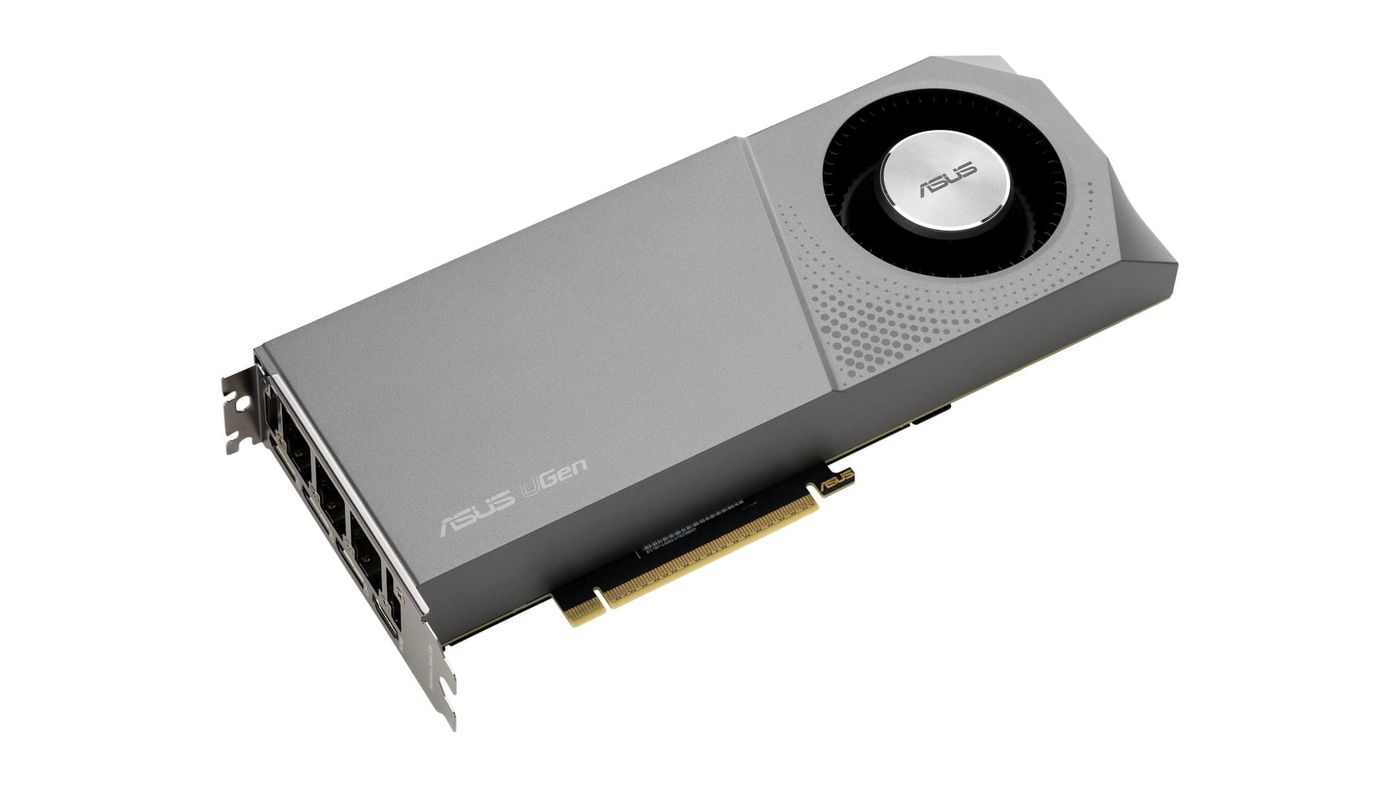
ASUS is finally making an Intel Arc card. Its first one is the UGen Arc Pro B70, a 32 GB workstation card for people who run AI models on their own machines. The product page is up on ASUS’s global site, but there’s no price or release date yet.
What is the ASUS UGen Arc Pro B70?
It’s ASUS’s take on Intel’s Arc Pro B70, built on the biggest chip in Intel’s Battlemage generation. Arc Pro is Intel’s workstation line, sold for AI, 3D and design work with drivers certified for those programs. ASUS skipped Intel’s first Arc cards and the smaller Battlemage models, Wccftech notes. ASUS also uses a stainless steel mounting bracket. Almost the whole product page is about running AI locally.
ASUS built it to be stacked. It’s a two-slot card with a blower fan, which pushes hot air out the back of the case instead of onto the card next to it. The memory has ECC, which catches the stray errors that can wreck a long AI job. ASUS claims up to 80 percent faster AI performance than Intel’s previous Arc Pro B60.
What are the ASUS Arc Pro B70’s specs?
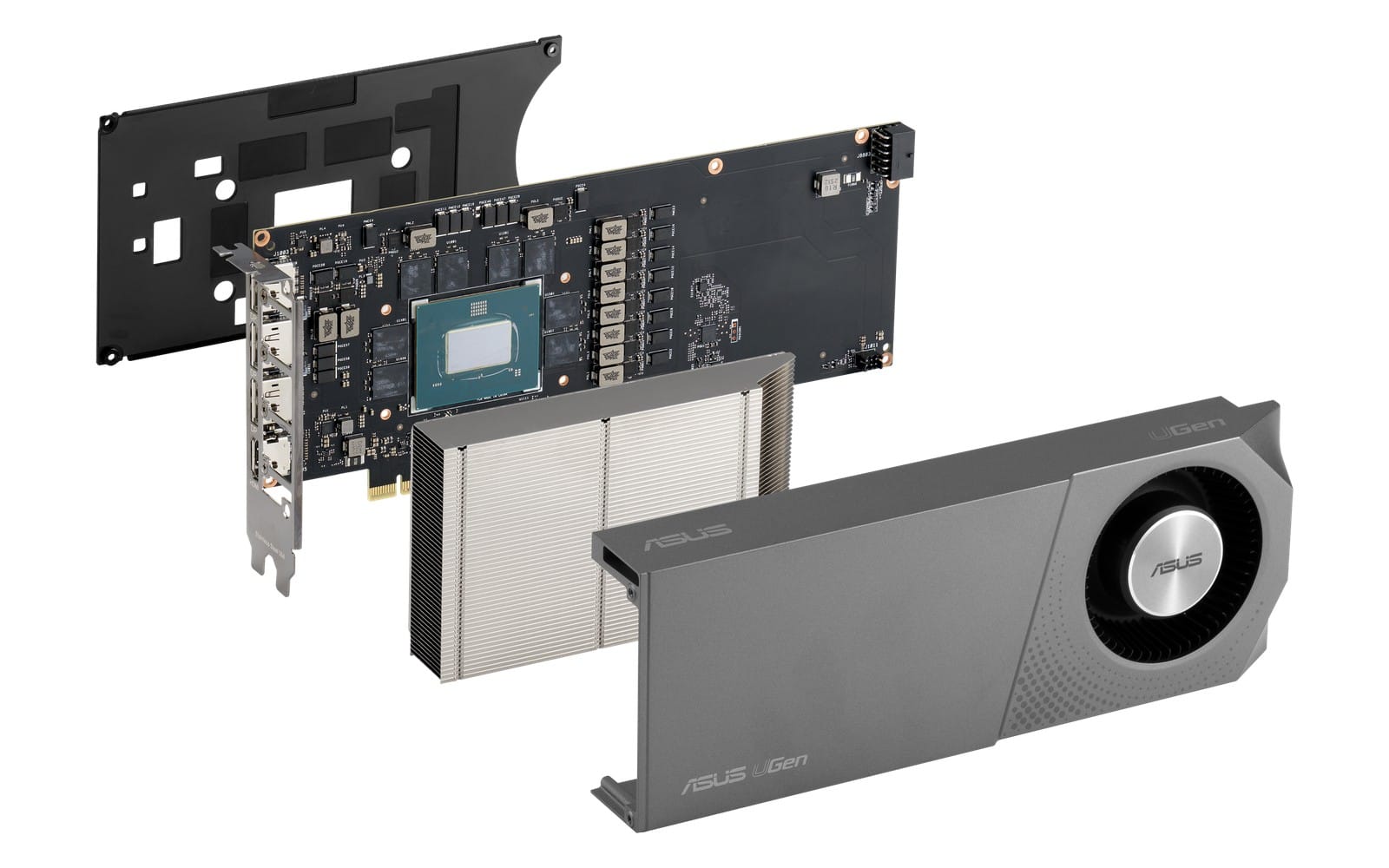
The headline numbers are 32 GB of GDDR6 with ECC, 608 GB/s of memory bandwidth and 310 W of board power. Here’s the full sheet from ASUS’s spec page.
| Chip | Intel Arc Pro B70 (Xe2, Battlemage): 32 Xe-cores, 256 XMX AI engines, 32 ray tracing units |
| Max clock | 2,800 MHz |
| Memory | 32 GB GDDR6 with ECC, 19 Gbps, 256-bit |
| Memory bandwidth | 608 GB/s |
| AI and compute | 367 TOPS (8-bit integer AI math), 22.94 TFLOPS (32-bit floating-point math) |
| Interface | PCIe 5.0 x16 |
| Outputs | 3x DisplayPort 2.1 (UHBR13.5), 1x HDMI 2.1b |
| Power | 310 W board power, one 12V-2x6 connector, 750 W power supply recommended |
| Size and weight | 267 x 111 x 40 mm, two slots, 1.09 kg |
| Cooling | Blower fan with dual ball bearings |
| Operating systems | Windows 11, Linux |
| Warranty | 3 years, limited; in-region repair and returns through ASUS service centres |
How much memory bandwidth does it have?
608 GB/s, which matches Intel’s spec. For local AI, that number matters almost as much as capacity. Here’s why: every token the model writes, roughly a word, means reading through the model in memory, so faster memory means faster answers once the model fits. The R9700 is a little quicker at 640 GB/s, and the RTX 5090 is way ahead at 1,792 GB/s. PCs built on AMD’s Ryzen AI Max+ PRO 495 have much more memory but read it at 273 GB/s.
How much power does it draw?
ASUS rates it at up to 310 W. That’s above anything in Intel’s datasheet, which puts Intel’s own card at 230 W and partner cards between 160 and 290 W. ASUS uses a single 12V-2x6 connector, the newer 16-pin plug, and includes an adapter. Intel’s card gets by with one 8-pin. ASUS recommends a 750 W power supply.
How much does the ASUS Arc Pro B70 cost?
Nobody knows yet. ASUS hasn’t announced a price and no US store has the card, so other B70s are the best guide. Intel set a $949 list price for its own version at the March launch, according to its launch presentation. Intel doesn’t sell that card directly, but system builders such as Puget Systems carry it. ASRock’s Arc Pro B70 Creator is $1,299.99 on Amazon. That works out to about $30 per gigabyte of memory at Intel’s price, or $41 at ASRock’s.
What AI models fit on one card?
ASUS says most models up to about 27 billion parameters. Intel’s OpenVINO release notes say 20 to 30 billion. At those sizes the model has to be quantized, meaning compressed to fewer bits per parameter. ASUS’s example is Qwen3.6 27B at 8 bits. Smaller models leave plenty of room: OpenAI says its gpt-oss-20b runs in 16 GB. Its bigger gpt-oss-120b needs 80 GB, so ASUS lists it only for a four-card build.
Whatever memory is left holds the context, meaning the conversation, documents or code you give the model. That’s why ASUS pitches the card for long prompts and several users at once. ASUS notes that its model lists are estimates based on model size and that Intel hasn’t validated every setup.
Can you run two or four cards together?
Yes. ASUS supports up to four, for 128 GB in total. With two, a community test that ASUS cites ran Qwen3-Coder-Next 80B, compressed to about 4 bits, at 43.4 tokens per second. Four cards stretch to models of about 120 billion parameters using vLLM, which splits one model across several cards. You’ll need a workstation board with four x16 slots spaced two apart.
On paper, four cards at 310 W each add up to 1,240 W. That’s space-heater territory. Real use looks lower, though: another community result ASUS quotes measured a whole four-card system at about 720 W under full load.
What AI software runs on it?
Intel’s own tools, plus open-source engines that support Arc, on Windows 11 or Linux. CUDA is out. ASUS’s first pick is Intel’s LLM Scaler, ready-made containers for the vLLM serving engine, which added the B70 in May. llama.cpp is the popular open-source engine for running models locally, and for it ASUS says the Vulkan backend is the easiest to get running and Intel’s SYCL backend is the fastest. The llama.cpp SYCL guide hasn’t caught up, though: the only Battlemage card it lists as tested is the smaller Arc B580.
Intel added the B70 to OpenVINO, its AI toolkit, in version 2026.1 in April. Ollama, the app many people use to run models at home, works through Intel’s oneAPI toolkit, though ASUS’s own FAQ says standard Ollama has limited Arc support. For image and video generation, ASUS points to ComfyUI.
Two things on ASUS’s page are out of date. It still advertises IPEX, the Intel Extension for PyTorch, which Intel has retired in favour of standard PyTorch. And Intel’s older IPEX-LLM library is archived, with a warning on its page that it’s unsupported and has known security issues.
Arc Pro B70 vs RTX 5090: which is better for local AI?
The 5090 is much faster, and the B70 is much cheaper. Both have 32 GB, but the RTX 5090’s GDDR7 reads at nearly three times the speed, and it runs CUDA. Nvidia launched it at $1,999. Intel’s $949 list price is less than half that, and even ASRock’s $1,299.99 card comes in about $700 under.
Arc Pro B70 vs Radeon AI PRO R9700: which is better value?
They’re closely matched, and the B70 lists for less. Both are 32 GB GDDR6 workstation cards on a 256-bit bus. AMD’s R9700 is about 5 percent faster at 640 GB/s and runs AMD’s ROCm software in place of Intel’s. AMD launched it at $1,299, which is $350 above Intel’s list price and about what ASRock’s B70 costs. It’s also the card inside the Lucebox Zero 495, a local AI desktop built around a Ryzen AI Max+ PRO 495.
How does it compare with Nvidia’s RTX Pro cards and unified-memory PCs?
Against Nvidia’s workstation cards, the B70 is cheaper per gigabyte. Intel’s own comparison is the RTX PRO 4000 Blackwell, which has 24 GB and averaged $1,775.94 in February.
Unified-memory PCs, where the processor and graphics share one big pool of memory, are a different trade. A Ryzen AI Max+ PRO 495 machine with 192 GB costs $6,499 to $7,449 and can give up to 160 GB to graphics, though at 273 GB/s. Laptops built on Nvidia’s RTX Spark chip, like the Surface Laptop Ultra, reach 128 GB, with up to 96 GB for graphics. Four B70s also add up to 128 GB, for $3,796 at Intel’s price plus the workstation around them, but software has to split each model across four separate 32 GB pools.
| Memory for AI | Bandwidth | Price | Price per GB of memory for AI | |
|---|---|---|---|---|
| ASUS UGen Arc Pro B70 | 32 GB GDDR6 | 608 GB/s | Not announced | - |
| Intel Arc Pro B70 (Intel’s card) | 32 GB GDDR6 | 608 GB/s | $949 list price | about $30 |
| ASRock Arc Pro B70 Creator | 32 GB GDDR6 | 608 GB/s | $1,299.99 on Amazon | about $41 |
| AMD Radeon AI PRO R9700 | 32 GB GDDR6 | 640 GB/s | $1,299 at launch | about $41 |
| Nvidia GeForce RTX 5090 | 32 GB GDDR7 | 1,792 GB/s | $1,999 at launch | about $62 |
| Nvidia RTX PRO 4000 Blackwell | 24 GB GDDR7 | 672 GB/s | $1,775.94 average (Intel, Feb.) | about $74 |
| Ryzen AI Max+ PRO 495 PC | 192 GB unified, up to 160 GB for graphics | 273 GB/s | $6,499 to $7,449, whole PC | about $41 to $47 |
| RTX Spark laptop (Surface Laptop Ultra) | 128 GB unified, up to 96 GB for graphics | about 300 GB/s (reported) | $5,899.99, whole laptop | about $61 |
Price per GB is the price divided by the memory available for AI. For the two unified-memory machines, the price covers the whole computer.
Can it play games?
Yes, believe it or not. Intel’s datasheet says so, even though ASUS doesn’t mention gaming at all. Swap the workstation driver for Intel’s regular consumer driver and you get day-one game drivers and XeSS, Intel’s upscaling.
When can you buy one?
ASUS hasn’t said. Right now there’s just a product page and spec sheet on its global site, nothing on the US site yet, and ASUS warns that its products may not reach every market.
Who is it for?
People building a local AI workstation who want 32 GB per card and are willing to live with Intel’s software. It makes the most sense in a two-to-four-card build, which is what the blower and slim two-slot body are designed for. If your tools need CUDA, buy Nvidia. If you want one model bigger than 32 GB in a single pool of memory, a unified-memory PC gets you further. ASUS’s version adds a stainless steel bracket and ASUS’s service network, and whether those are worth extra depends on a price ASUS hasn’t given.
Honestly, it’s exciting to see Intel step up here. Its graphics have usually trailed Nvidia and AMD, and the software still does, but 32 GB at a $949 list price is a statement when Nvidia’s 16 GB RTX 5080 launched at $999 and sells for more now. AI demand has pushed memory and card prices way up, so anything that brings this much memory under $1,000 is a big deal. It can game, too, but at this price it’s an AI card first.
Nerd Alert
Your Turn
What are YOUR thoughts
What have your experiences been? Let us know.