News · News · PC Hardware · Local AI
RTX Spark Mini PCs Are Here: What the ASUS, Dell and MSI Desktops Cost
Nvidia’s RTX Spark chip is now in small Windows desktops from ASUS, MSI and Dell. At 64GB they cost about the same as the matching laptop, and they’re only a little faster.
https://averagetechnerds.com/nvidia-rtx-spark-mini-pc-desktops-asus-dell-msi/
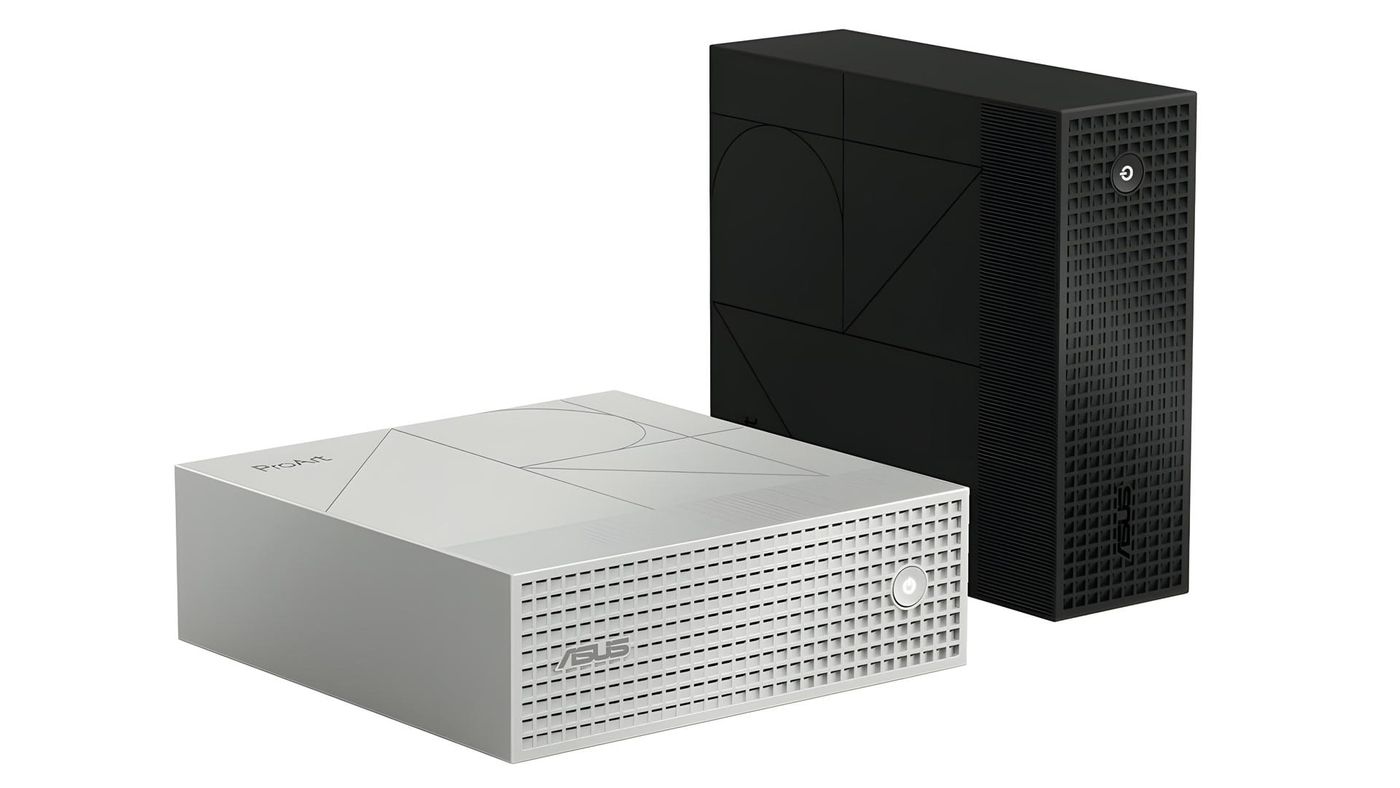
Picture a silver box about 15 centimeters on each side and five tall, sitting quietly next to your monitor. Inside is Nvidia’s own Windows chip, the same one Microsoft put in the Surface Laptop Ultra last month. ASUS put that box on sale on November 18 for $4,499, and MSI and Dell sell their own takes on it. So why would anyone buy the box instead of the laptop with the same chip? At 64GB they cost about the same, and the reasons to pick one over the other have little to do with speed.
What is RTX Spark, in plain words?
Nvidia’s first processor for full Windows PCs, unveiled at Computex in June. Think of a normal gaming PC as two kitchens, one for the processor and one for the graphics card, each with its own fridge. RTX Spark puts both cooks in one kitchen with one giant fridge, so the graphics side can use most of the memory when it needs to. And AI models need a lot of fridge. The processor half, called Grace, shares its name with the chips Nvidia sells for data centers.
Most Windows PCs run on Intel or AMD chips. Arm chips are a different design, the kind in your phone, so a Windows app either needs an Arm version or gets translated on the fly. Until this fall, an Arm Windows PC almost always meant a Qualcomm Snapdragon inside. RTX Spark laptops arrived in October, and now the desktops follow, each with the full 20-core version of the chip, which Nvidia rates at up to one petaflop of AI performance, a thousand trillion simple calculations a second.
Isn’t the laptop the same thing?
Chip for chip, yes. Same price, too, more or less. Microsoft’s Surface Laptop Ultra starts at $2,599.99, but that model has the smaller 18-core chip and 24GB of memory. Match the desktops, with the full chip and the same memory, and the prices land close together:
| Memory | ASUS ProArt GR1X | MSI EdgeMesa N AI+ | Surface Laptop Ultra (20-core) |
|---|---|---|---|
| 64GB | $4,499 | $4,399 | $4,299.99 |
| 128GB | No price found | $7,499 | $5,899.99 |
At 64GB, the desktops and the laptop cost about the same, and the laptop throws in a 15-inch screen. At 128GB the laptop is the cheaper one, though the MSI does pack a lot more storage. And if 32GB is plenty for you, the laptop with the full 20-core chip costs less still, and no desktop with a price tag comes with less than 64GB. Either way, the desktop isn’t the budget pick.
Is the desktop any faster?
A bit, mostly on graphics. The desktop gets more room to breathe, up to 140 watts in the ASUS against 80 in a laptop, and Windows Central measured what that buys, both machines with 128GB. In 3DMark’s Time Spy, the desktop pulls about 13% ahead.
| Test | ProArt GR1X desktop | Surface Laptop Ultra |
|---|---|---|
| Geekbench 7 single-core | 2,655 | 2,710 |
| Geekbench 7 multi-core | 24,849 | 23,571 |
| 3DMark Time Spy | 14,478 | 12,771 |
| Llama 3.1 8B text generation | 52.8 tokens a second | 49.44 tokens a second |
| Stable Diffusion XL image | 20.6 seconds | 25.05 seconds |
Nearly double the power buys about 5% on multi-core work, and the single-core score actually drops a hair. Where the desktop earns its keep is image generation: Stable Diffusion XL runs about 20% quicker, and if you make images by the hundred, those four and a half seconds an image add up. So the speed alone won’t sell it.
Which desktops can you buy?
Three, if you can find one in stock, plus Microsoft’s pre-order and one box that is only on sale in China. Stock is already thin, two days in.
| Desktop | Starting price | Memory and storage | Status |
|---|---|---|---|
| ASUS ProArt GR1X | $4,499 | 64GB and 1TB to start, up to 128GB | Sold out on November 19 at the ASUS Store and Best Buy |
| MSI EdgeMesa N AI+ | $4,399 (64GB, 1TB); $7,499 (128GB, 4TB) | 64GB or 128GB | 64GB on sale; 128GB sold out |
| Dell Creator Edition Desktop | $7,034 (128GB, 1TB); $7,464 (128GB, 2TB) | 128GB, with 1TB to 4TB | On sale, delivery by December 7 |
| Mechrevo Master Road X10 | CNY 32,999 (64GB, 1TB); CNY 49,999 (128GB, 2TB) | 64GB or 128GB | On sale in China only |
| Microsoft Surface RTX Spark Dev Box | $5,999.99 | 128GB and 2TB | Pre-order |
If 128GB is the goal, Microsoft’s Dev Box is the cheapest way there on this list, at $5,999.99 with 2TB, though it’s still on pre-order.
One more box went on sale on November 19, though only in China. Mechrevo’s Master Road X10 costs CNY 32,999 with 64GB, about $4,950, and CNY 49,999 with 128GB. It’s the same chip in a slightly bigger 1.25-liter case, and Mechrevo says its own AI SSD lets big models spill out of memory onto the drive. Nobody outside Mechrevo has tested that yet, and there’s no word on a US release.
What’s the ASUS ProArt GR1X like?
The surprise from the only box anyone has tested: memory can matter even when you’re not running AI. In Windows Central’s office-style test, a 64GB ASUS fell behind a 128GB one. Otherwise, they found it cool, quiet and tiny on a desk, with too few ports in awkward places, and called the price super expensive. Got a lot of accessories? Budget for a USB hub.
| Part | ASUS ProArt GR1X |
|---|---|
| Chip | RTX Spark N1X, 20 CPU cores, 6,144 GPU cores, up to 140W |
| Memory | 64GB or 128GB of unified memory |
| Storage | 1TB SSD, with a second slot for another drive |
| Ports | USB-C for power, three more USB-C, HDMI 2.1, 10Gb Ethernet |
| Wireless | Wi-Fi 7, Bluetooth 5.4 |
| Size and weight | 150 x 150 x 51 mm, 1.48 kg |
That spare drive slot is handy. Storage is the one thing you can easily add later, and model files get big fast. A single large model can take up tens of gigabytes.
And the MSI EdgeMesa N AI+?
Same chip, same footprint as the ASUS, give or take a few millimeters, and a little lighter at 1.32 kg against 1.48. You don’t get to mix and match, though: it’s 64GB with 1TB of storage, or 128GB with 4TB, and only in the US for now.
That gap is huge. About $3,100 separates the two, for 64GB of extra memory and 3TB of extra storage. The memory is soldered to the board, so you can’t start with 64GB and add more later. Whatever size you’ll need next year, you’re buying today, so think about the models you want to run a year from now, rather than the ones you run now.
What about Dell’s?
Dell’s is the priciest of the three, and the laptop makes that hard to swallow: a 128GB Surface Laptop Ultra with the same chip costs about $1,100 less and comes with a screen. What the Dell gives you instead is the same tiny box as the ASUS, built to run all day off a hefty 280-watt power brick. You get three USB-C ports that can drive displays, plus HDMI 2.1, 10Gb Ethernet and Wi-Fi 7. Nobody has reviewed it yet, so for now that extra money buys a promise.
What can 128GB actually do?
Big models. A model’s size is counted in parameters, roughly how many numbers it learned, and Nvidia says 128GB holds models with 120 billion of them. The biggest gaming graphics card today has 32GB, a quarter of that, which is why models this size usually live in the cloud.
Imagine a local assistant that reads your project folder, or an agent that sorts files and drafts replies overnight, without a cloud bill for every request, and still working when your internet doesn’t. No waiting in line behind everyone else on a busy cloud server, either. Nvidia’s Switchyard tool can even split the work, keeping everyday tasks on the box and sending only the hardest questions to a cloud model. Anything it sends to the cloud does leave the box, so set it up with that in mind. Make images or video in ComfyUI, or render big scenes in Blender? Those lean on the same big pool of memory.
Will your apps run on it?
Most should. Not all. Apps built for Arm run natively, and Microsoft’s translator, called Prism and built into Windows 11, handles the rest, though not as fast as an Arm-native app. Edit video or photos? You’re in luck, because Adobe and Nvidia are already working on your apps, from RTX-accelerated Premiere and Photoshop to Arm-native Illustrator and InDesign. Write code? Nvidia’s CUDA tools run natively too. Rely on a VPN or a hardware utility? Make sure it has an Arm version, because software with its own drivers can’t be translated.
Can it play games?
Surprisingly well, for a box sold on AI. With Nvidia’s DLSS upscaling on, Windows Central saw low triple-digit frame rates in Cyberpunk 2077 at 1440p with ray tracing, and nearly double that with DLSS generating extra frames between the real ones. The reviewers still wouldn’t buy it as a gaming PC. Online games are the weak spot, because some anti-cheat software won’t run on Arm yet. Call of Duty, PUBG and the games that use EA’s anti-cheat aren’t due until sometime in 2027. Treat the gaming as a bonus. A nice one, on a box that fits beside your keyboard, with no separate graphics card to buy.
Where does the DGX Spark fit?
Nvidia’s DGX Spark is the developer’s version of the same idea: a small AI box running Nvidia’s own Linux, with a fast port for linking boxes into one bigger machine, something none of the Windows desktops advertise. It started out as the cheap way in. Two price rises later, it isn’t, and the 64GB ASUS now costs less than a 64GB DGX Spark. If you want one machine for AI and everything else on Windows, the RTX Spark boxes are now a real alternative.
What should you watch for next?
If you’re not in a rush, wait a few weeks. More brands are coming, the reviews of the MSI and the Dell will show how each case handles the chip, and some of these should be back in stock by then. Our upcoming mini PC tracker follows all of it.
Desktop or laptop, then?
Where will it live? If you need one machine that goes everywhere, the Surface Laptop Ultra gets you the same chip and memory for about the same money at 64GB, and less at 128GB, plus a screen and a battery. If it’ll sit in one spot doing AI work day and night, the desktop is built for that, and its wired networking keeps your model files moving. And if you just want a fast Windows PC that doesn’t do much local AI, a regular desktop costs far less than either.
Nerd Alert
Your Turn
What are YOUR thoughts
What have your experiences been? Let us know.