Windows Is Getting a Way to Run One AI Model Across Several PCs Over USB4
A coming Windows preview links PCs over USB4 so they can run one AI model together, pooling memory. How it works, how fast it is, and why it’s for test PCs only.
https://averagetechnerds.com/rdma-over-usb4-windows-pcs-local-ai/
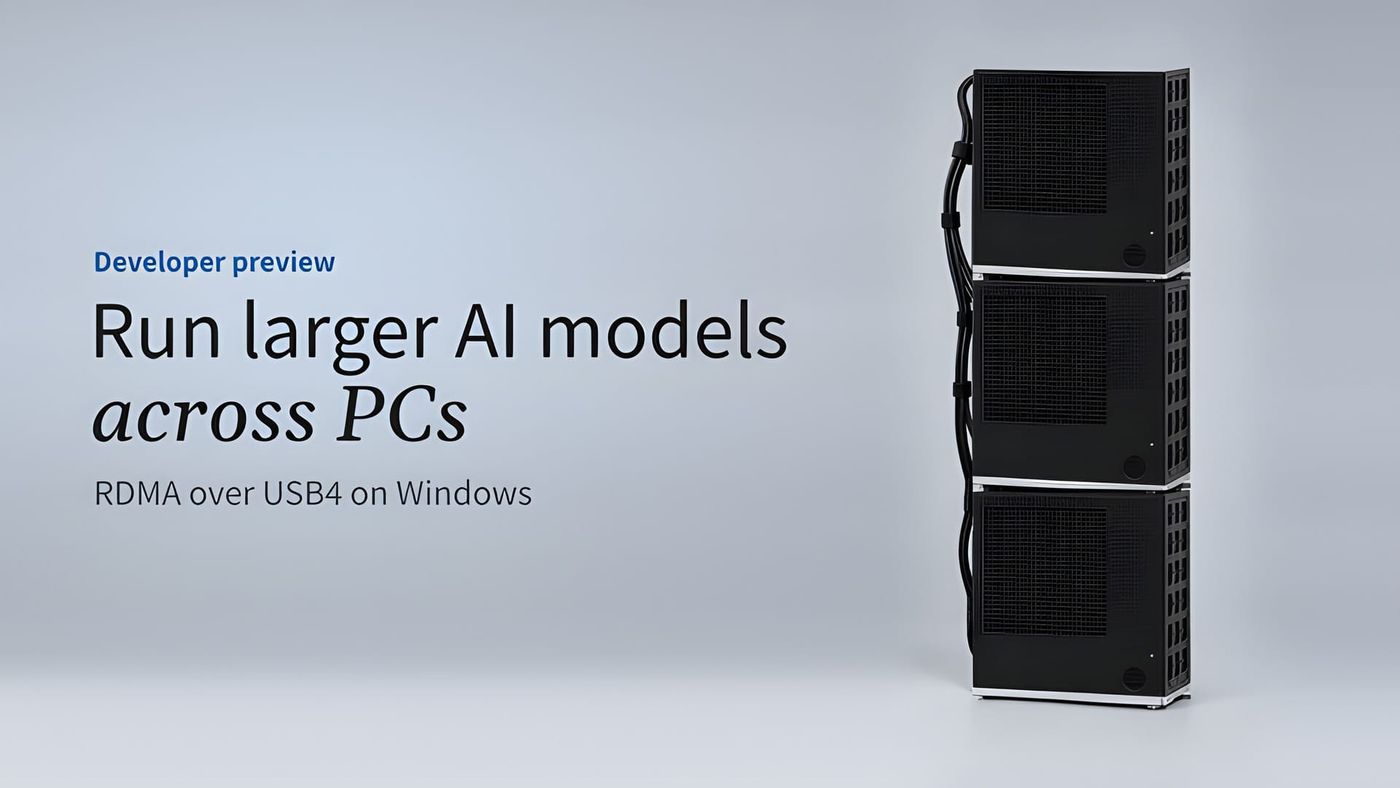
The biggest open AI models you can download don’t fit in one PC. They need more memory than almost any desktop has, so you shrink them, pay for the cloud, or build a small server rack. On November 19, Microsoft showed a fourth option, and it’s a cable. Connect two or three Windows PCs to each other with USB4, and a developer preview coming to Windows lets them split one model between them, pooling their memory and graphics power. Macs got a version of this almost a year ago. Windows is catching up, though for now only for developers willing to switch off Secure Boot.
Why would you want two PCs to run one model?
Memory. It’s always memory. An AI model has to sit in memory while it runs, and the big ones are huge. If you’ve tried to load one and watched it fail, you’ve hit it.
I’ve got an RTX 3090 in my home server, where I run chat models, and it has 24GB of memory. Qwen3’s 235-billion-parameter model, the one in Microsoft’s demo, is a 142GB download even after it’s been shrunk to 4-bit, a common way to run big models at home. That’s about six of my graphics cards’ worth. The model also needs room beyond its own files for the conversation it’s working on. Microsoft’s answer was to split it across three mini PCs with 128GB each, all built on AMD’s Ryzen AI Max, the same chip family as the Framework Desktop.
Think of it as pushing three desks together to lay out one big map. Each PC holds part of the model, and they work on every answer together.
What does RDMA actually do?
RDMA stands for remote direct memory access, and the easiest way to picture it is skipping the paperwork. Normally, data headed to another PC gets packed up, passed through the networking software and unpacked again on the other side. RDMA lets one PC skip most of that and write straight into the other one’s memory. Data centers have done this for years with network cards built for servers, and this preview does it over the USB4 port your PC might already have.
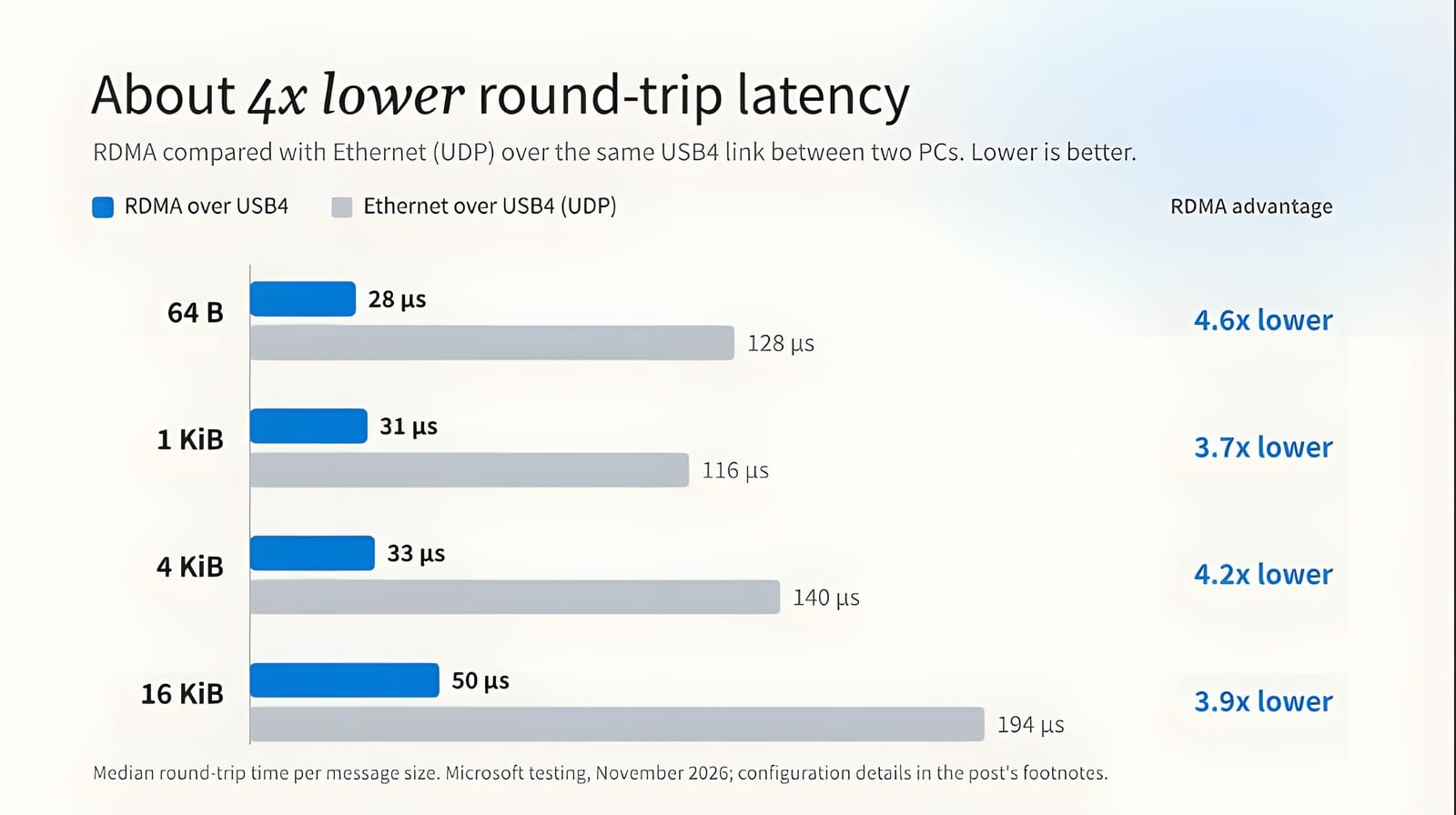
The reason it matters is chatter. When PCs share one model this way, they swap data many times for every token, the small chunk of text a model produces at a time. So the delay on each swap sets the pace more than raw speed does. Microsoft measured that delay at 28 to 50 millionths of a second, about four times shorter than regular networking over the same USB4 cable.
How fast is it?
Fast enough to actually use. In Microsoft’s lab, the three AMD mini PCs ran that 142GB Qwen model at about 18.5 tokens a second, which is a reply writing itself out faster than you can read it. Intel ran OpenAI’s GPT-OSS-120B across three of its own PCs and got about 49. At 63GB, with Windows and the conversation needing room too, that model won’t fit on one of their 64GB machines.
Adding a fourth Intel PC only nudged that to about 54. This is about room. Speed comes second to running a model that wouldn’t fit on one machine at all.
Is it cheaper than one big machine?
For the model in Microsoft’s demo, no. It isn’t even close. That 142GB download should fit in a single computer with 192GB of memory, like the Ryzen AI Max+ PRO 495 machines we’ve been tracking at about $6,200 to $7,450 with a 2TB drive. Three 128GB boxes like the ones in the demo run around $3,400 to $4,200 each, which adds up to more than $10,000 before you’ve bought a single cable.
Linking still has two good reasons to exist. One is a model too big for any single box you can buy. The other is PCs you already own: if two or three USB4 machines with plenty of memory are already on your desk, a few cables cost far less than a new computer.
What do you need?
Start with the ports, and Windows can check them for you. Open Settings, then Bluetooth & devices, then USB. A USB4 Hubs and Devices page means your ports are the kind Windows manages itself, which is what the preview asks for. No page usually means no luck, though on some PCs it only shows up once something USB4 is plugged in. A plain USB-C port promises nothing, but Thunderbolt 4 and 5 ports count, since Microsoft lists them as USB4-capable.
Then count them. You’ll need more than you’d guess. Every PC connects straight to every other one, so three machines need two USB4 ports each and three cables running in a triangle, and chaining them in a line instead hurts performance badly. The cables have to be real USB4 ones, which rules out the charge-only kind sitting in your drawer. A 40Gbps link is enough for the preview, while the faster 80Gbps ports, the Thunderbolt 5 kind, only reach that speed with a cable certified for it.
Your PCs don’t have to match, either. A Microsoft engineer answering questions under the announcement said different graphics chips and NPUs can share the work as long as the app can handle mismatched machines, and Microsoft’s own llama.cpp sample can. What does have to match is the software: the same preview build and drivers on every PC.
Last comes the switch that makes this a spare-PC project. Turning the feature on takes test signing, a Windows boot setting that lets it load test drivers, and that requires Secure Boot to be off. Secure Boot is the firmware check that stops tampered software from loading before Windows starts. Without it, you lose that protection, and some games won’t start at all. Battlefield 6, for one, won’t let you play with Secure Boot off, because its anti-cheat needs it. Microsoft’s own line is that the preview requires test signing, so use dedicated test PCs. Got a spare? Good.
Hasn’t the Mac done this already?
Yes. Apple got there almost a year ago. It added the same kind of fast link to macOS 26.2 last December over Thunderbolt 5, and Apple’s Claris is testing an app called Harbor to make a cluster of Macs easier to set up. What Windows brings is plain USB4, so PCs with ordinary 40Gbps ports can join in too.
What’s next?
First comes the Insider build, which Microsoft says is coming soon to the Experimental channel. Developers can already dig into the driver code, the test tools and a modified version of llama.cpp, the open-source engine that apps like LM Studio and Ollama are built on, but those apps can’t use any of this yet. Microsoft expects other frameworks to be able to adopt the same Windows interface, but it hasn’t named any.
A regular Windows release for everyone is on Microsoft’s list of things to explore, with no date attached. If you were about to buy hardware for big models today, the numbers above still point to one big-memory box for anything that fits in it. Linking PCs makes sense when you already own them, or when the model won’t fit anywhere else.
Nerd Alert
Your Turn
What are YOUR thoughts
What have your experiences been? Let us know.