Device profile · Device Profiles · Handheld Gaming · Retro Gaming · Retro handhelds
AYN Thor Lite: What It Emulates, Dual-Screen Setup, and Lite vs Base, Pro and Max
What the Snapdragon 865 Thor Lite can and can’t run, how to set up DS and 3DS across both screens, and whether it’s worth $70 more for the Base.
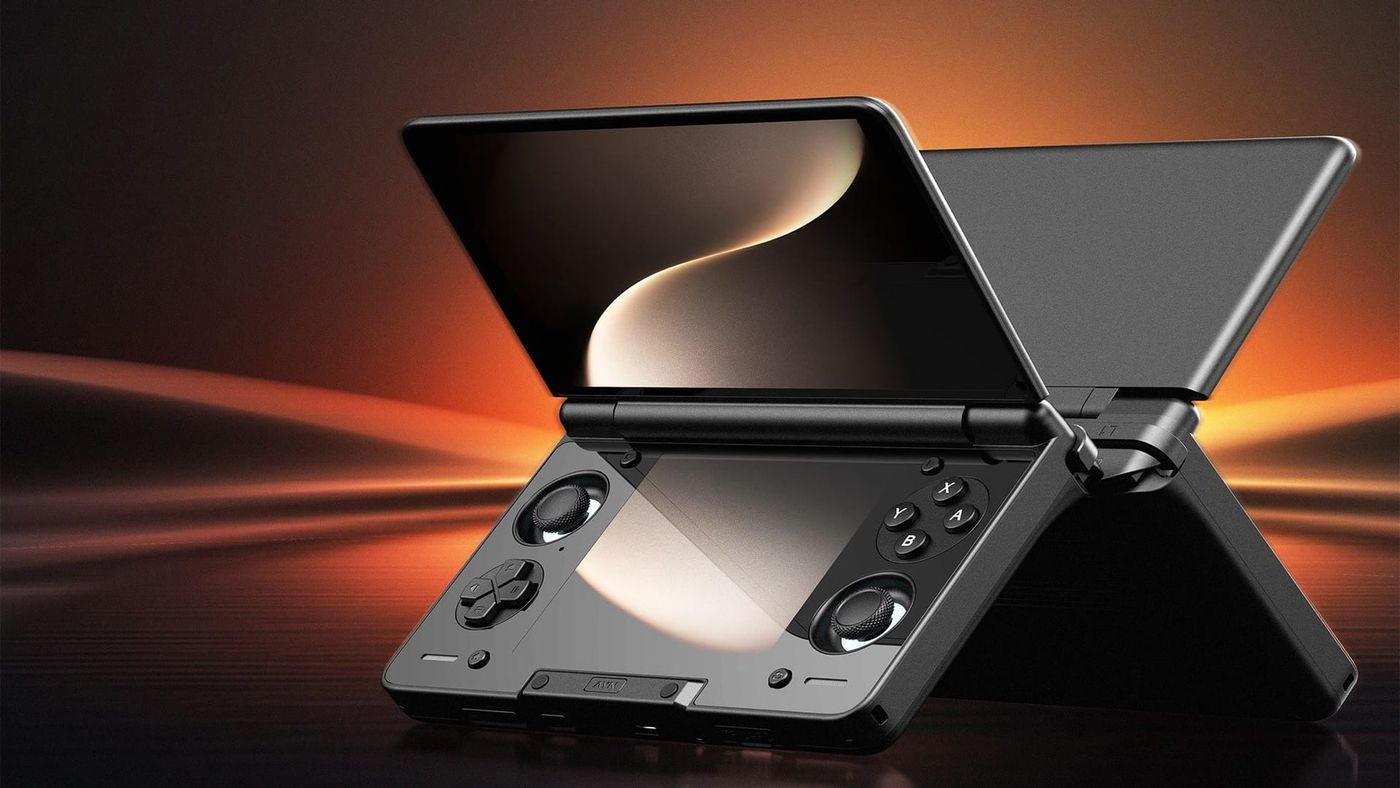
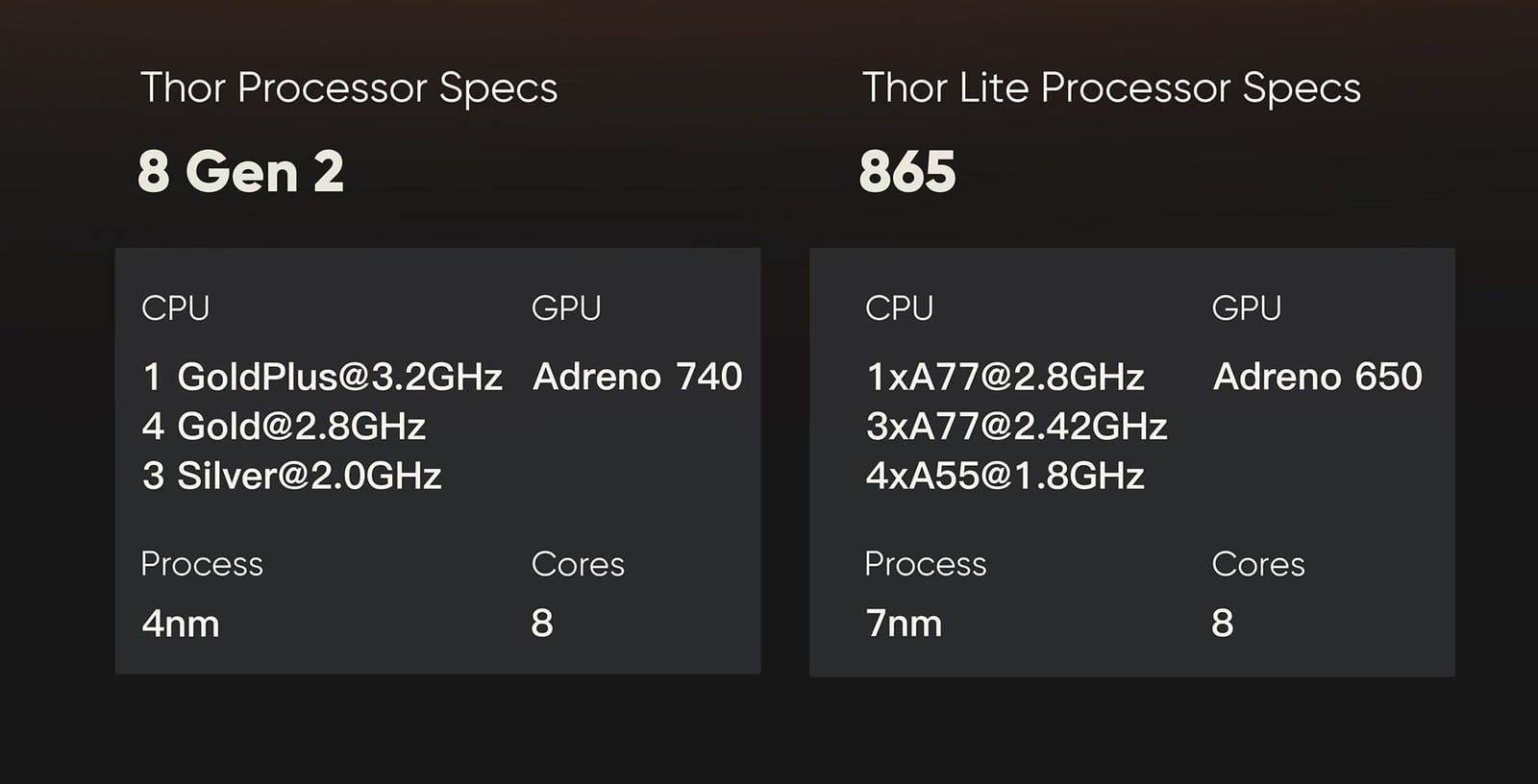
The AYN Thor Lite is the cheapest way into AYN’s two-screen Thor. You get the same clamshell, the same two AMOLED touch screens, the same battery and the same controls as the Base, Pro and Max. What changes is the chip. The Lite runs a Snapdragon 865 where the others have a Snapdragon 8 Gen 2. For DS and 3DS that barely matters. For Switch and PC games, it matters a lot.
What is the AYN Thor Lite?
It’s not really its own product. It’s the first option on AYN’s Thor listing, the same clamshell with a smaller, cheaper brain. Open it and the big screen on the lid is for the game, while the nearly square one below the hinge is where DS and 3DS bottom screens, and AYN’s control panel, live.
The Lite pairs that body with a Snapdragon 865, the chip from 2020’s flagship phones. Six years on, that’s still enough for most things up to PS2, which is exactly the library a two-screen handheld is for.
What can the AYN Thor Lite emulate?
Most of it. Up to the PS2 era, anyway. Most of the reviewer notes come from Zelpio, which tested most systems on the Lite.
| System | How it runs | What reviewers found |
|---|---|---|
| Up to SNES, GBA, Genesis | Runs well | Plays excellently, often upscaled to 1080p |
| PS1 | Runs well | |
| N64 | Runs well | Plays excellently |
| DS | Runs well | Every DS game tested ran at 4x |
| 3DS | Runs well | Games run upscaled 4x, with occasional stutter the first time shaders compile |
| PSP | Runs well | Plays excellently |
| Dreamcast | Runs well | Plays excellently |
| Saturn | Most games playable | Sega Rally Championship dipped on the accurate core; a lighter core fixed it |
| GameCube | Most games playable at 2x | Most games at 2x in Dolphin with a custom GPU driver |
| Wii | Untested on the Lite | |
| PS2 | Most games playable at 2x | Most of the library at 2x, with more slowdown than GameCube |
| Switch | Lighter games only | Metroid Dread and Super Mario Wonder are the ceiling; Odyssey needs 75% resolution |
| Wii U | Not practical | |
| PS3 | Not practical |
3DS is the Lite’s sweet spot, and it’s the best reason to pick it over a Base if money’s tight. One long-term owner on gardinerbryant.com runs every 3DS game at four times native resolution. GameCube and PS2 are where the older chip starts to show. They need help to reach 2x, like Turnip, a free graphics driver that replaces Qualcomm’s, which the Zelpio review used in Dolphin. Switch is where the 865 runs out.
PC games work too, through apps like GameNative. Keep them light, though. In Zelpio’s testing, indie hits like Balatro, Slay the Spire 2 and Hades 2 held 55 to 60 FPS at 720p, Hades 2 in High Performance mode, and that’s the kind of game this chip is happy with. Something as old as Fallout 3 already struggles. My PC games on Android guide has more, including why DroidDeck treats this chip’s graphics as experimental.
How do you set up DS and 3DS on two screens?
This is what the Thor is for, and both main emulators finally handle it properly. For DS, update melonDS to version 2.0.0 or later, which added two-screen support with test units from AYN and AYANEO. If you’ve been playing on an older version, save in-game before you update, because save states won’t carry over.
For 3DS, Azahar added layouts for a second display in version 2126.0. Pick “Opposite of Primary Screen” and the 3DS bottom screen goes to the Thor’s bottom screen, where it belongs. An in-game menu lets you switch layouts without leaving the game.
Both screens are capacitive, like a phone’s, so an original DS or 3DS stylus won’t register. A capacitive stylus with a mesh or disc tip does. And AYN’s control panel has a mode for which screens are on, so you can run a single-screen system on the top screen alone and save battery.
How do you set up the AYN Thor Lite?
Before anything else, check for an update under Settings, then System update. On a new Thor, it matters. This year’s updates fixed overheating and Wi-Fi problems on the first Thors, and added an 80% charge limit option. AYN only announces them on Discord, and there’s no manual.
Then get to know the control panel on the bottom screen, because you’ll use it a lot. Standard or Performance mode covers most systems, and High Performance is for the heaviest games. If the fan gets loud, the Quiet setting is one tap away. And if you want an app on a particular screen, long-press its icon and pick the top or bottom display.
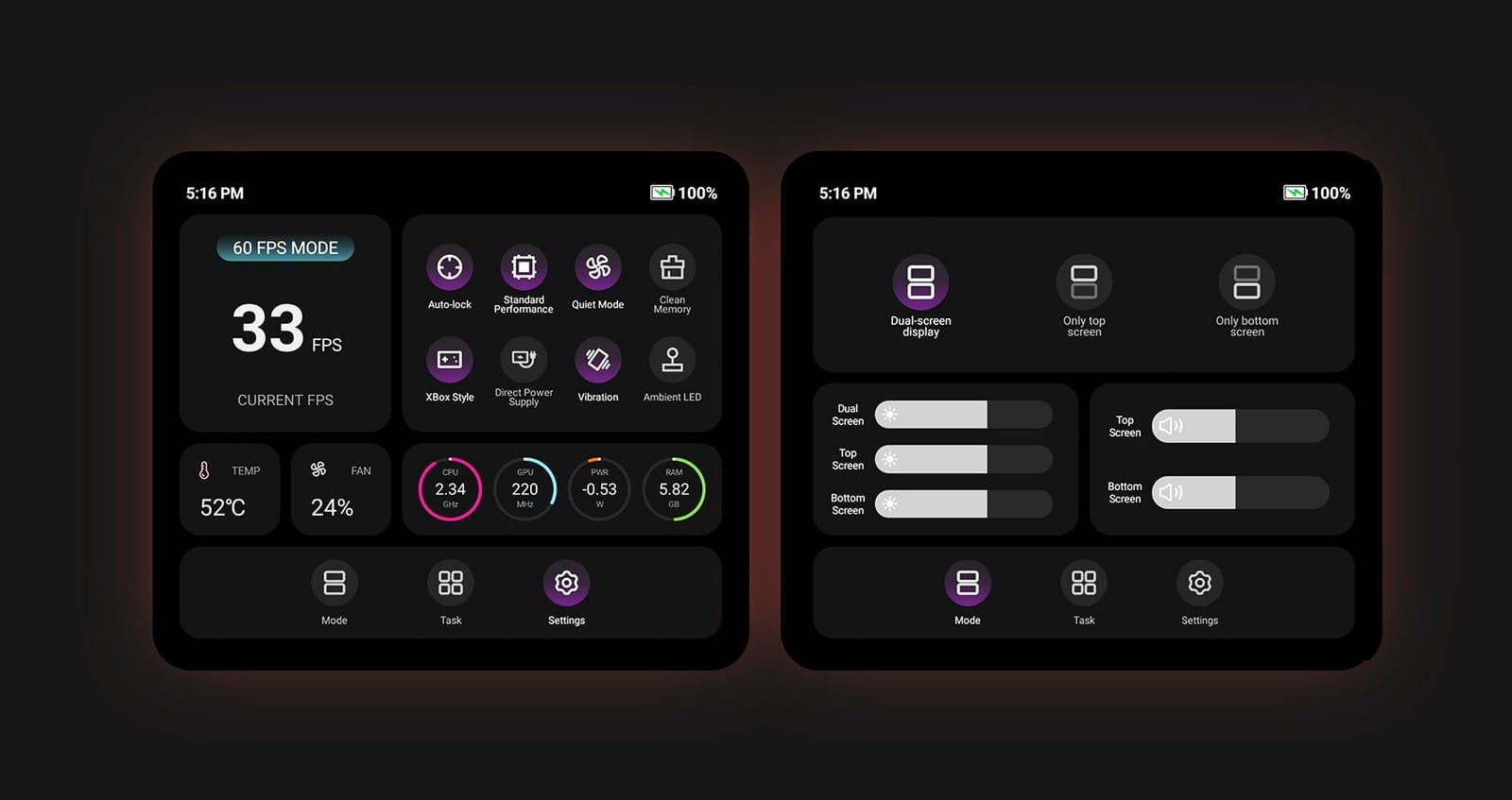
Leave the screens at their defaults, 120Hz on top and 60Hz below. There’s a mode that runs both at 120Hz, but one reviewer saw the bottom panel tear in fast motion with it on, and the bottom screen is mostly for DS games and menus anyway.
Then pick a front end, the menu you browse and launch your games from. On a Thor, pick one that uses the second screen. iiSU is a good place to start, since it began as a Thor project. Its DS mode puts your library on the bottom screen and box art on top, and that’s exactly what this handheld is for. ES-DE is the more flexible option, since it can send each game to whichever screen you choose, and my front ends and firmware guide covers it.
BIOS files are the other bit of setup. A BIOS is the start-up code from the original console, and you’ll want copies from your own PS1 and PS2, plus a Saturn if you use the more accurate Saturn emulator. Good news for a DS machine: melonDS doesn’t need one. Switch emulation needs keys and firmware from your own Switch.
Can the AYN Thor Lite run Linux?
Yes. If you want Steam, Armada OS turns the Lite into something like a small Steam Deck, booting into Game Mode on the top screen. It’s tested on the Lite, though the gyro and HDR support the other Thors got hasn’t reached it yet. Be careful with the download. Use the files for the Lite’s chip, labelled SM8250, because a bootloader made for another chip can leave the device unable to start. Double-check before you flash anything.
If you’d rather it act like a dedicated emulation console, ROCKNIX supports the Lite too. Either way, start from a microSD card. Installing to internal storage keeps Android but wipes its apps and data.
AYN Thor Lite vs Base, Pro and Max
You won’t feel the difference in your hand. It’s all inside: the chip, with slower memory and wireless along for the ride. The part that’s easy to miss is TV play. The 8 Gen 2 models output up to 4K, while reviewers report the Lite tops out at 1080p.
| Lite | Base | Pro | Max | |
|---|---|---|---|---|
| Chip | Snapdragon 865 | Snapdragon 8 Gen 2 | Snapdragon 8 Gen 2 | Snapdragon 8 Gen 2 |
| RAM | 8GB LPDDR4X | 8GB LPDDR5X | 12GB LPDDR5X | 16GB LPDDR5X |
| Storage | 128GB | 128GB | 256GB | 512GB or 1TB |
| Wireless | Wi-Fi 6, Bluetooth 5.1 | Wi-Fi 7, Bluetooth 5.3 | Wi-Fi 7, Bluetooth 5.3 | Wi-Fi 7, Bluetooth 5.3 |
| Colours | Black | Black | Four colours | Four colours |
| Price now | $259 | $329 | $409 | $479 or $579 |
The gap is bigger than the price suggests. AYN’s own numbers give the 8 Gen 2 nearly three times the graphics score of the 865, and graphics is what Switch emulation leans on.
So the choice is simple. If DS, 3DS and everything up to PS2 and GameCube are what you’ll play, the Lite gives you nearly the same experience for less. If Switch, Wii U, PS3 or PC games matter, that extra $70 is the best money you’ll spend on a Thor.
What should you know before you buy?
Check the ship date first. The Lite has had long waits since launch, and AYN’s current batch lists it as backordered.
Then there’s comfort. The body is flat with no grips, and the triggers have sharp edges, so reviewers recommend a grip, and AYN sells one. The fan pulls air in from the back, too, so don’t play it on a pillow or a blanket.
Spot a thin line at the hinge? Don’t panic. AYN says it’s usually a joint line from moulding, and a real crack is a warranty case. If DS and 3DS are what you’re after and none of this puts you off, the Lite is the Thor to get.
AYN Thor Lite specs
| Spec | AYN Thor Lite |
|---|---|
| Chip | Snapdragon 865: one 2.8GHz, three 2.42GHz and four 1.8GHz cores; Adreno 650 graphics |
| Memory and storage | 8GB LPDDR4X, 128GB UFS 3.1, microSD |
| Top screen | 6.0-inch AMOLED touch, 1920x1080, 120Hz, 650 nits |
| Bottom screen | 3.92-inch AMOLED touch, 1240x1080, 60Hz, 550 nits |
| Battery | 6,000mAh |
| Cooling | Fan |
| Controls | D-pad, ABXY, two Hall sticks with light rings, stacked shoulder buttons, Start, Select, Home, Back, AYN button |
| Ports | USB-C with video out, 3.5mm headphone jack, microSD |
| Wireless | Wi-Fi 6, Bluetooth 5.1 |
| Size and weight | 150 x 94 x 25.6mm closed, 380g |
| Software | Android 13 |
| Colour | Black |
On the shelf
Retro handheldsSee the whole story →Nerd Alert
Your Turn
What are YOUR thoughts
What have your experiences been? Let us know.