News · News · Handheld Gaming · Controllers & Accessories · Console Gaming · Switch 2 controllers
PowerA’s Pokémon Ditto Controller for Switch 2 Is Out: What You Get for $69.99
The Ditto edition of PowerA’s Advantage Wireless controller is out at $69.99: Hall effect sticks and back buttons, with no rumble or amiibo.
https://averagetechnerds.com/pokemon-ditto-switch-2-controller/
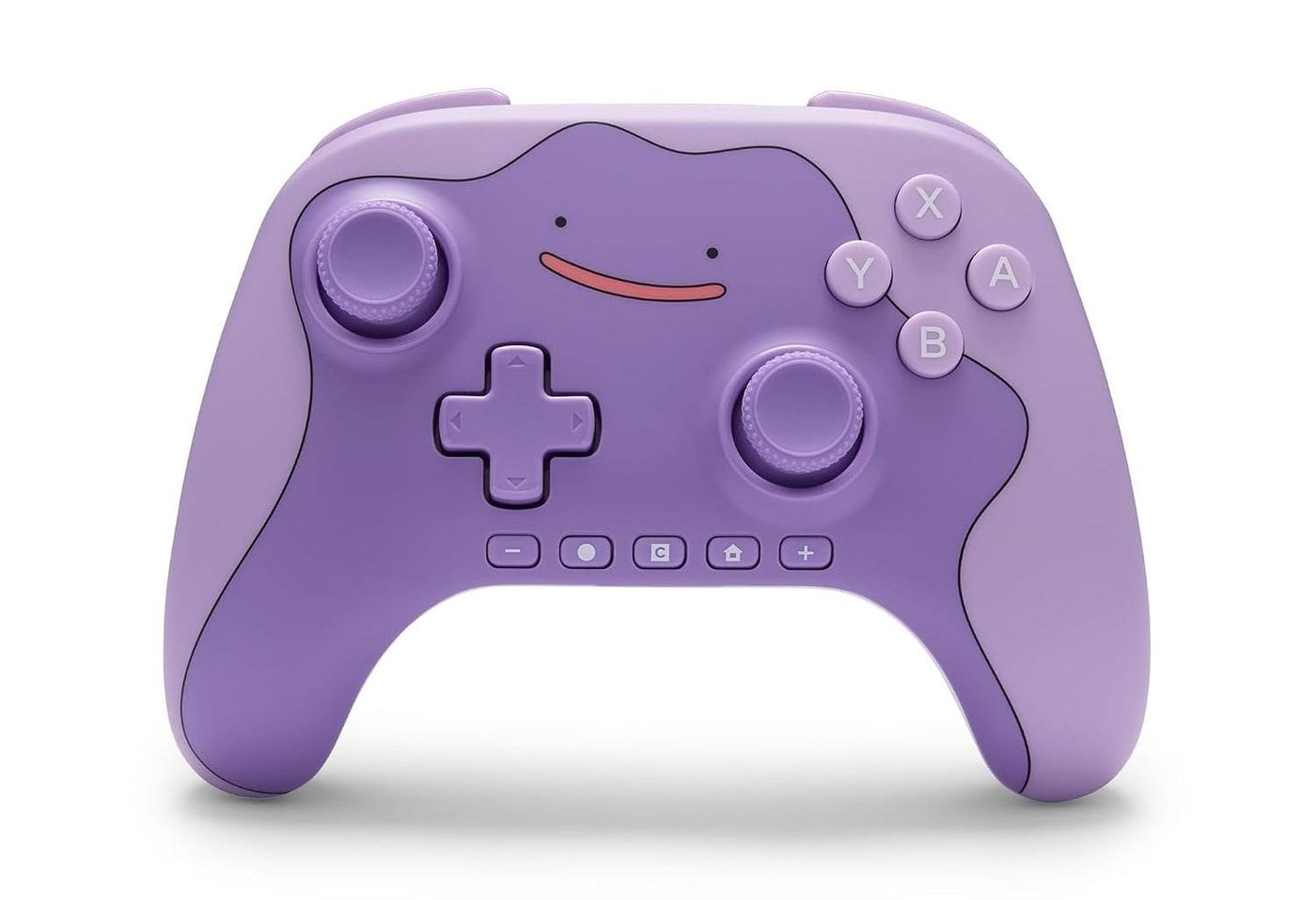
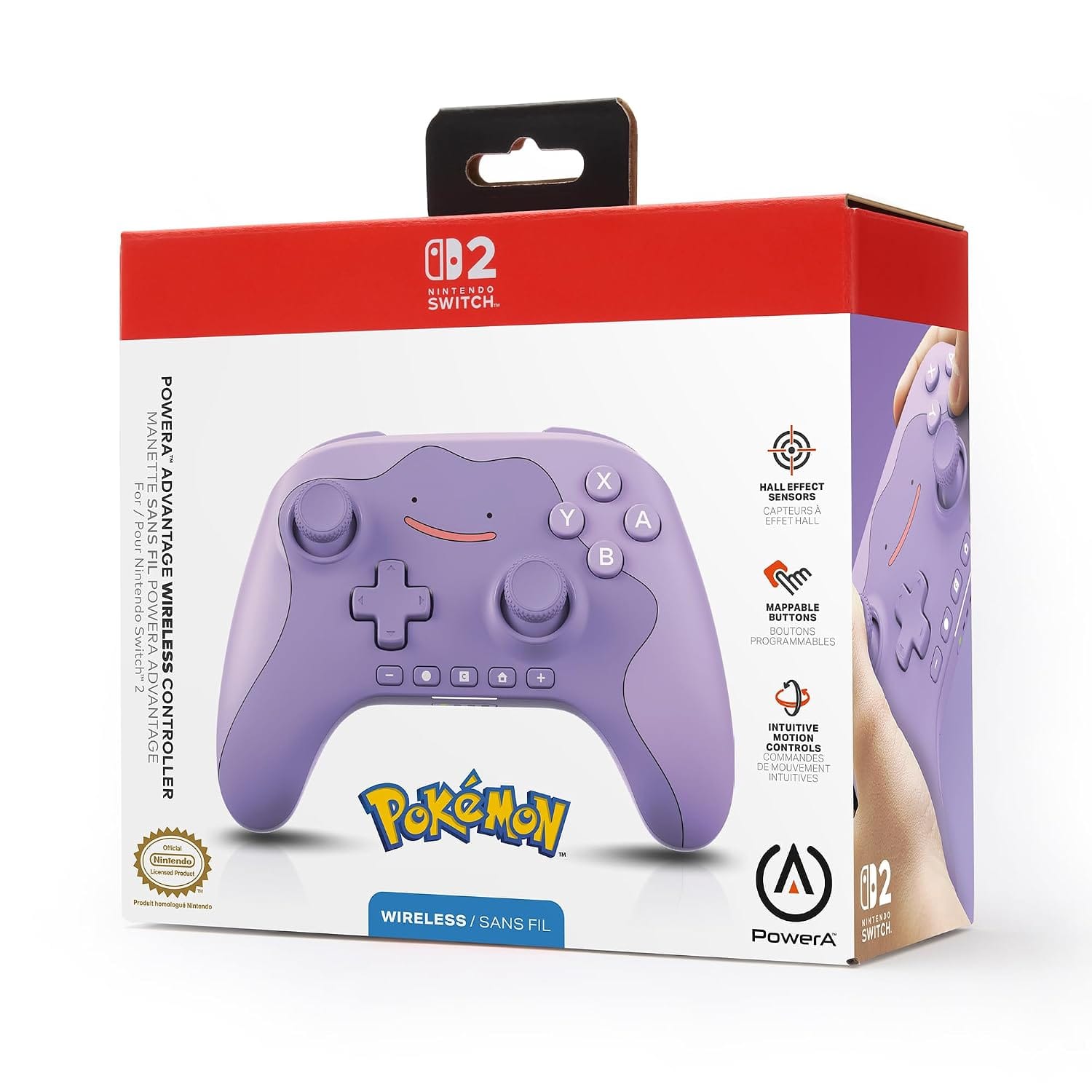
Ditto’s whole trick is turning into other Pokémon. This time it turned into a Switch 2 controller. PowerA has wrapped its Advantage Wireless Controller in Ditto purple, put that goofy little face front and centre, and it’s now in stock on PowerA’s own store for $69.99. Under the costume, it’s a controller with some real strengths and a few gaps you’ll want to know about before it lands on your doorstep. Here’s all of it: what it does, what it skips, and how it stacks up against Nintendo’s own Pro Controller.
What is the Ditto controller?
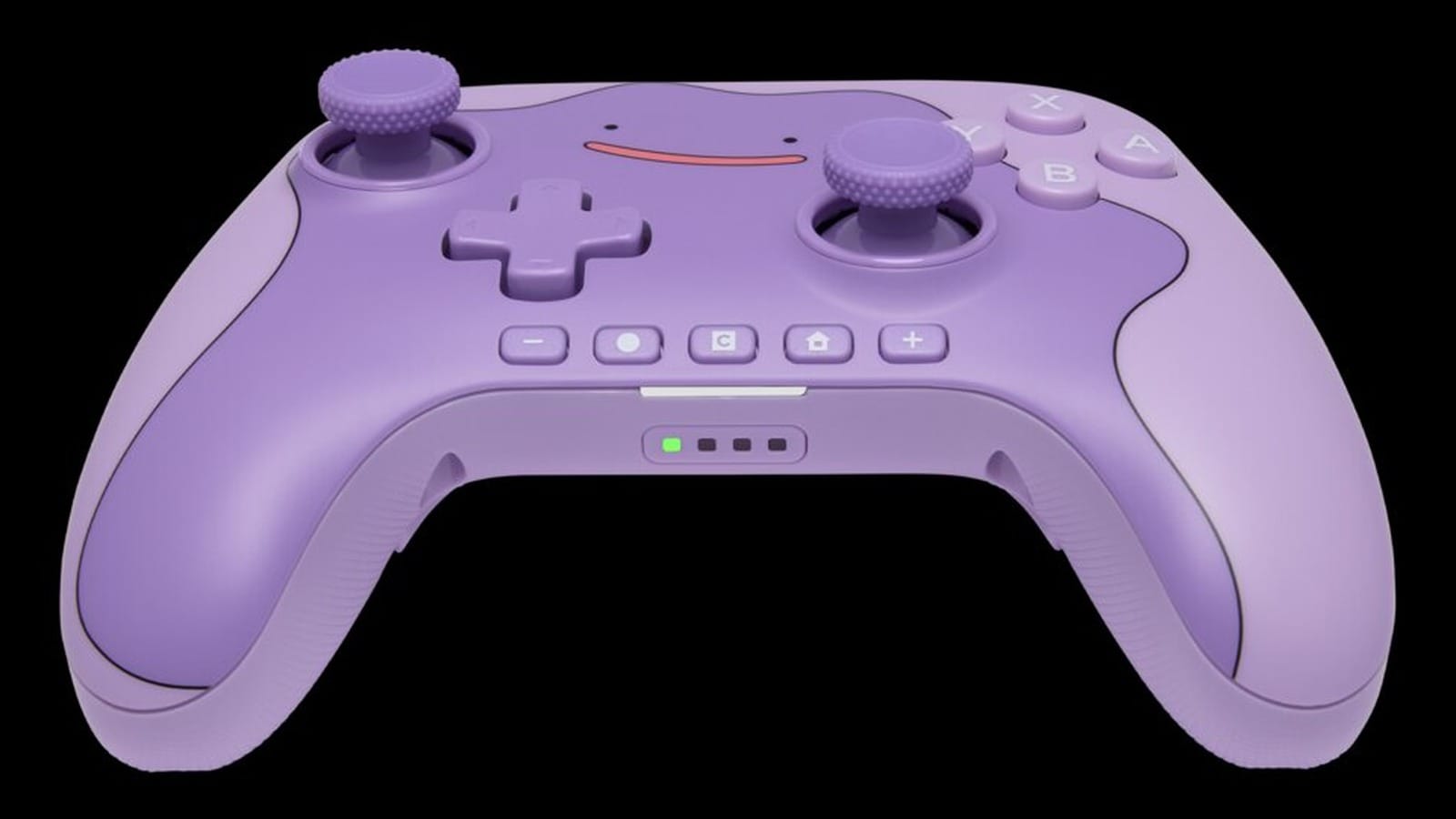
It’s PowerA’s Advantage Wireless Controller for Nintendo Switch 2 wearing a Ditto design, and it’s officially licensed by Nintendo. It’s the same controller PowerA sells in ten other styles, the plain black one included. The difference is all on the outside: a light purple shell, a darker purple Ditto spread across the front with its face right in the middle, and purple sticks, face buttons and D-pad. Dexerto pointed out that the purple sticks look like Ditto’s little hands, and once you’ve seen it, you can’t unsee it.
The timing makes sense. Ditto is the star of Pokémon Pokopia, the Switch 2 game that came out in March, where you play as a Ditto that has taken on human form. A Ditto controller for a Ditto game is about as on the nose as it gets, in the best way.
How much is it, and where can you buy it?
$69.99, and it’s in stock on PowerA’s store right now as a regular order. When it was revealed on October 1, retailers listed it for October 20, and Amazon US took pre-orders at $50.99 at the time, according to Dexerto and Pocket Tactics. So if you remember seeing it for about fifty bucks, that wasn’t your imagination. That was Amazon’s pre-order price at the reveal.
Ditto sits at PowerA’s regular price, by the way. Most styles are $69.99, including the Pokémon Mega Evolutions edition and the plain black one, but a few, like Mario & Yoshi and Mario Kart World, are $5 cheaper at $64.99. And if you want to go all in, Walmart carries a matching Ditto slim case for the Switch 2 at $19.99.
Does it have Hall effect sticks?
Yes, and that’s the best thing about it. Hall effect sticks read their position with magnets instead of a sensor that rubs as the stick moves, so the part that usually wears out isn’t there. Worn sensor contacts are what cause stick drift, the slow creep where your character walks off on their own, and the Joy-Con made that problem famous. PowerA’s manual lists the sticks as 12-bit Hall effect.
Nintendo’s own Switch 2 Pro Controller still uses the older potentiometer sticks, according to iFixit’s teardown as reported by Notebookcheck. That gives the cheaper controller an edge where it counts most over the long run.
Does it have rumble?
No, none at all. PowerA’s manual says it doesn’t support HD Rumble 2 or HD Rumble, and that’s its whole answer when it explains why vibration doesn’t work. There’s no basic rumble motor hiding in there either.
It’s not the only thing missing. There’s no amiibo reader, no IR camera and no headphone jack. The C Button opens GameChat on the Switch 2, but it doesn’t do anything on the original Switch. And it won’t run games that need Joy-Con specifically.
Can it wake up your Switch 2?
No. You’ll need to turn the console on another way, then pick up the controller. Cog Connected’s review flagged this as a con, and said none of the PowerA controllers its reviewer had tried could do it either. It’s a small thing until it’s the thing you notice every single time you sit down to play.
Does it work on PC?
PowerA doesn’t list PC among the systems it works with. It’s built and sold as a Switch controller, so if you want one pad for both your Switch 2 and your computer, look elsewhere.
How do the back buttons work?
You program them on the controller itself, no app needed. Hold the PROGRAM button on the back for three seconds, press the button you want to copy, then press one of the two back buttons. You can map A, B, X, Y, the shoulder buttons and triggers, either stick click, or a D-pad direction, and the controller remembers it after it powers off. Holding PROGRAM for five seconds clears both.
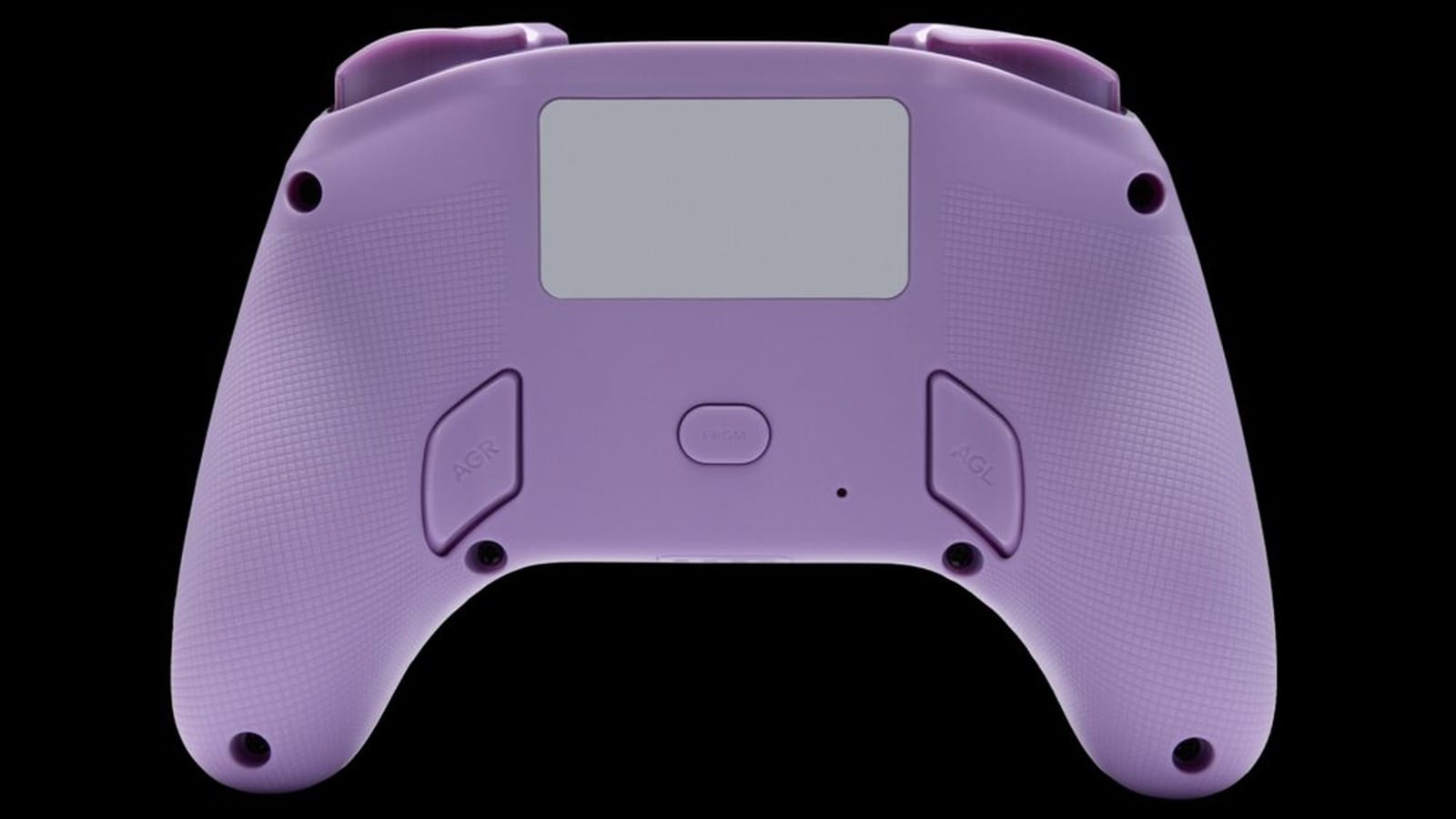
Worth knowing: Nintendo’s Pro Controller has two mappable back buttons too, called GL and GR. So the back buttons are a nice extra here, though they won’t set it apart from Nintendo’s controller.
Is it worth it over the Switch 2 Pro Controller?
For a lot of people, yes, as long as you know what you’re giving up. The Ditto costs $20 less and has the sticks that should last longer. The Pro Controller has HD Rumble 2, amiibo, a headphone jack and longer battery life. Here’s how the two line up.
| PowerA Ditto controller | Nintendo Switch 2 Pro Controller | |
|---|---|---|
| Price | $69.99 | $89.99 |
| Sticks | Hall effect | Potentiometer |
| Back buttons | 2, programmable | 2 (GL and GR), mappable |
| Motion controls | Yes | Yes |
| Rumble | None | HD Rumble 2 |
| amiibo | No | Yes |
| Headphone jack | No | Yes |
| Battery | Up to 30 hours | About 40 hours, per Insider Gaming |
Nintendo’s controller has cost $89.99 since its accessory price increase in August 2025. If you want HD Rumble 2 from something other than Nintendo, Genki’s Manta, a pro controller with its own screen, plays supported HD Rumble 2 effects on the Switch 2. It isn’t due until early 2027, though.
What do reviewers say about it?
The Ditto edition itself hasn’t turned up in any review so far, but the controller underneath has a few, and they don’t agree. Insider Gaming and Nintendo-Insider liked it. Insider Gaming praised the light, clicky buttons, the grippy sticks and the lack of any connection problems, while Nintendo-Insider found the buttons a little too clicky but rated the D-pad above the Pro Controller’s. Cog Connected gave it 83 out of 100. TechRadar was much harder on it, calling the plastic cheap and hollow, the triggers shallow and spongy, and the stick tips hard and scratchy. It said it would have been a much more positive review at around $49.99.
The battery claim holds up. TechRadar found the 30 hours accurate, and Nintendo-Insider measured about 29. The complaint that comes up most is the layout. PowerA moved the plus and minus buttons down to a row at the bottom of the face, next to Home and Capture, and reviewers called it awkward.
Who is it for?
Pokémon fans who want a second controller that looks the part, and anyone setting up couch multiplayer who’d rather not pay Nintendo’s price for every pad. The Hall effect sticks are a genuine plus for a controller you plan to keep around. If you play mostly in handheld mode, a grip that replaces the Joy-Con, like the NYXI Hyperion 3 or the CRKD Nitro Deck 2, solves a different problem. And if rumble, amiibo or a headphone jack are part of how you play, the Pro Controller is still worth the extra $20.
On the shelf
Switch 2 controllersSee the whole story →Nerd Alert
Your Turn
What are YOUR thoughts
What have your experiences been? Let us know.